

2026.07.02
LY Ads
Search Ads
Display Ads
Completed
Updates
July 2, 2026: Updated this article following the change to display the "One-time passcode" button as grayed out.
June 2, 2026: This article was updated due to the discontinuation of sign-in using one-time passcodes.
May 13, 2026: The article has been updated due to changes regarding the end of sign in using one-time passcodes.
April 7, 2026: This article has been updated because changes were made to the “Implementation details” regarding the end of support for sign in using a one-time passcode.
March 11, 2026: The article has been updated following the discontinuation of the Business ID switching feature in the Campaign Editor.
February 19, 2026: The article was published.
June 2, 2026: This article was updated due to the discontinuation of sign-in using one-time passcodes.
May 13, 2026: The article has been updated due to changes regarding the end of sign in using one-time passcodes.
April 7, 2026: This article has been updated because changes were made to the “Implementation details” regarding the end of support for sign in using a one-time passcode.
March 11, 2026: The article has been updated following the discontinuation of the Business ID switching feature in the Campaign Editor.
February 19, 2026: The article was published.
Product
LY Ads
Summary
As previously announced in “Details of integrated "Business ID",” we would like to inform you about the end of support for sign in using a one-time passcode and the end of support for the switching feature in Campaign Editor.
Discontinuation of sign-in using one-time passcodes
Date
May 31, 2026 (Sunday)
Details (Updated: July 2, 2026)
Following the end of support for sing-in with one-time passcodes, the "One-time passcode" button on the sign-in screen is now grayed out. Please use your Business Account to log in to the Campaign Management Tool.
If you need to sign in to or integrate an unintegrated Business ID, only sign in with a Yahoo! JAPAN ID is available.
If you cannot sign in with your Yahoo! JAPAN ID, you will need to create a new Business ID. To use your existing account with the newly created Business ID, a user with administrative access to the existing account must invite the user of the new Business ID to the account.
For more information about creating a Business ID and inviting users to an account, see the following pages.
Create a Business ID (available in Japanese)
Invite other users to your account
If you need to sign in to or integrate an unintegrated Business ID, only sign in with a Yahoo! JAPAN ID is available.
If you cannot sign in with your Yahoo! JAPAN ID, you will need to create a new Business ID. To use your existing account with the newly created Business ID, a user with administrative access to the existing account must invite the user of the new Business ID to the account.
For more information about creating a Business ID and inviting users to an account, see the following pages.
Create a Business ID (available in Japanese)
Invite other users to your account
Discontinuation of the Business ID switching feature in the Campaign Editor
Date
March 10, 2026 (Tuesday)
Summary
The feature that allows multiple Business IDs to be registered and switched within the Campaign Editor has been discontinued.
Data downloaded to your local environment in the Campaign Management Tool will continue to be available. If you plan to continue using it, please configure the following settings to require sign in each time. By signing in again when launching the Campaign Management Tool, you will be able to use the data in your local environment.
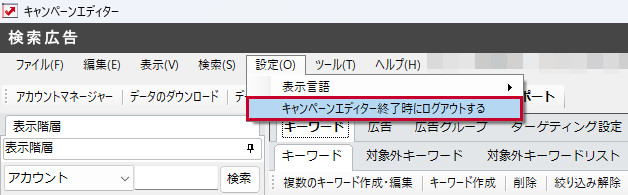
■Search Ads
Select “Settings” > “Sign out when closing the Campaign Management Tool.”
Data downloaded to your local environment in the Campaign Management Tool will continue to be available. If you plan to continue using it, please configure the following settings to require sign in each time. By signing in again when launching the Campaign Management Tool, you will be able to use the data in your local environment.
■Search Ads
Select “Settings” > “Sign out when closing the Campaign Management Tool.”
■Display Ads
Select “Settings” > “Sign in Information” > Uncheck “Save sign in information.”

Comments
Download the following PDF for more details.
Download the Document
Download the Document
- Related Tag:
- #LY Ads