

2026.04.02
LY Ads
Display Ads (Auction)
Search Ads
Search Ads (Shopping)
Completed
Updates
April 2, 2026: This article has been updated following the completion of this implementation.
March 25, 2026: Part of the downloadable materials has been updated.
March 13, 2026: Part of the downloadable materials has been updated.
March 11, 2026: Publication of this article has started.
March 25, 2026: Part of the downloadable materials has been updated.
March 13, 2026: Part of the downloadable materials has been updated.
March 11, 2026: Publication of this article has started.
Product
LY Ads Display Ads
LY Ads Search Ads
LY Ads Search Ads (Shopping)
LY Ads Search Ads
LY Ads Search Ads (Shopping)
Schedule
Wednesday, April 1, 2026
Summary
It is now possible to create and connect a Business Manager and a LINE Official Account when creating or editing an advertising account in the Product.
As a result, the following features can be used more smoothly, and improved usability of services provided by LINE Yahoo is expected.
The changes in the Campaign Management Tool related to this matter are as follows.
As a result, the following features can be used more smoothly, and improved usability of services provided by LINE Yahoo is expected.
- Features of Display Ads
- Features that require integration with a LINE Official Account (such as ads aimed at gaining friends and linking profile images of LINE Official Accounts)
- Audience list integration feature
- Measurement tag features
- New cross-service features of LY Ads scheduled to be provided in the future
The changes in the Campaign Management Tool related to this matter are as follows.
Changes to the Ad Account Creation and Edit Screen
A connection feature with Business Manager and LINE Official Account has been added to the advertising account creation and editing screen in the Campaign Management Tool.
If you apply via online signup, you can also create a new Business Manager and LINE Official Account within the same screen.
If you apply through an agency, please create them from each service’s screen.
If you apply via online signup, you can also create a new Business Manager and LINE Official Account within the same screen.
If you apply through an agency, please create them from each service’s screen.

*The above image is an example of the screen for customers applying through online sign-up. The displayed content is subject to change.
Mandatory Connection to Business Manager and LINE Official Account
For customers who applied via online signup, connecting to a Business Manager and a LINE Official Account is now required when creating additional advertising accounts on or after the implementation date.
However, connection to a Business Manager and a LINE Official Account will be optional in the following cases.
However, connection to a Business Manager and a LINE Official Account will be optional in the following cases.
- When applying through an agency
- When the registered “Address” at the time of ad account creation is outside Japan
- When creating an ad account via the Yahoo! JAPAN Ads API
- For ad accounts already created by March 31, 2026
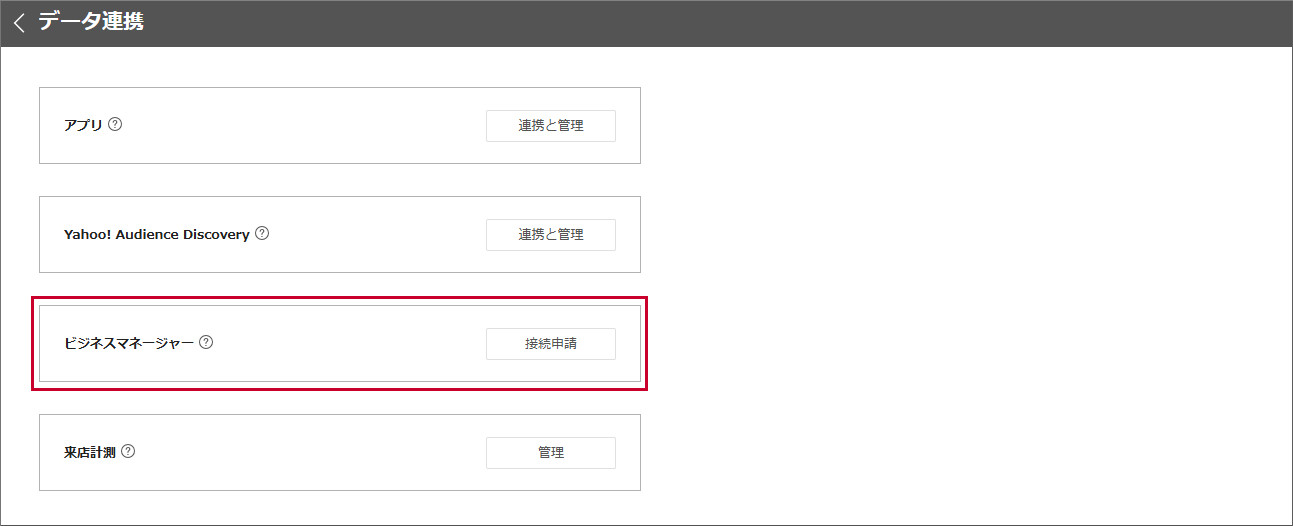
Discontinuation of the “Business Manager” Menu in “Data Linking”
The "Business Manager" menu under the "Data Integration" tool previously provided in Yahoo! JAPAN Ads Display Ads has been discontinued.
To connect to a Business Manager or LINE Official Account from the Campaign Management Tool, please configure it from the account creation or editing screen.
To connect to a Business Manager or LINE Official Account from the Campaign Management Tool, please configure it from the account creation or editing screen.
Notes
For customers who applied via online signup and meet the following conditions, creating additional advertising accounts is no longer possible on or after the implementation date.
- If the Business ID has not been integrated
- If you do not have Business Manager permissions (Administrator, Operator, Operator (Data), or Viewer (view only))
Materials
For information on procedures such as connecting a Business Manager and a LINE Official Account from an advertising account, please refer to "Connection of Business Manager and LINE Official Account".
For more details on this matter, please download and check the materials (PDF) below.
Download the material
For more details on this matter, please download and check the materials (PDF) below.
Download the material